
Pin Up login and registration: how to sign in and create an account
One account opens the whole Pin-Up online casino: slots, live dealers, Aviator, Pin Up Bet, esports and predictions. You sign in with a phone number or e-mail plus a password, and new players register in a two-step form that starts with the choice of the welcome bonus.
120% + 250 FS casino bonus or up to 125% + free bet for sports · 18+
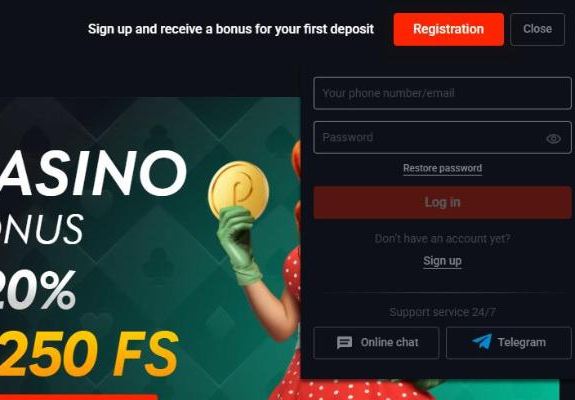
How to Log In to Pin Up
The login window opens as a drop-down panel on the right side of the page, so you stay on the game or match you were looking at. It has two fields, a password-visibility eye and direct buttons to the live chat and Telegram.
Open the official site
Use the address you registered on, in the browser, the app or a home-screen shortcut.
Click Log in
The button sits next to Registration in the top-right corner.
Enter your phone number or e-mail
The field “Your phone number/email” accepts either of the two contacts saved in the account.
Type the password and confirm
Use the eye icon to check what you typed before pressing Log in.
The login is the same for casino and betting, so the balance, bonuses and bet history appear wherever you sign in — desktop, Android app or mobile browser. On a shared computer, close the session with Log out and do not let the browser remember the password. If you prefer to sign in from the phone, see the Pin Up app download guide for Android and iPhone.
Pin Up Bet Login for Sports Betting
There is no separate account for betting. After you log in, the Sport, Live, Esports and Predictions sections of the sidebar use the same main balance as the casino, and “My bets” shows open and settled bets. The welcome bonus you picked at registration decides which bonus balance is used: the sports bonus can only be wagered with Live and Sport bets, the casino bonus only on eligible slots.
If you mainly bet on matches, it is worth switching the odds format in the sportsbook settings to the one you are used to — decimal, fractional, American, Hong Kong, Malaysian or Indonesian. Markets, the bet slip and the sports promos are covered on the page about the sportsbook.
How to Restore a Forgotten Password
Under the password field there is a “Restore password” link. Enter the phone number or e-mail of the account, follow the code or link you receive and set a new password. The Terms ask players to keep login details private and not share them with anyone; if you suspect someone else knows your password, change it at once and tell support.
- Check the spam folder if the reset e-mail does not arrive within a few minutes.
- Make sure you use the contact you registered with — a different number or e-mail will not be recognised.
- Choose a long, unique password; a password manager makes this easy on phone and desktop.
- If you no longer have access to the e-mail or phone, the 24/7 chat can help after an identity check.
How to Register at Pin Up
To sign up, open the registration page with its two-step indicator. The left side asks you to choose the first-deposit bonus, the right side holds the form. The official overview says it takes less than two minutes.
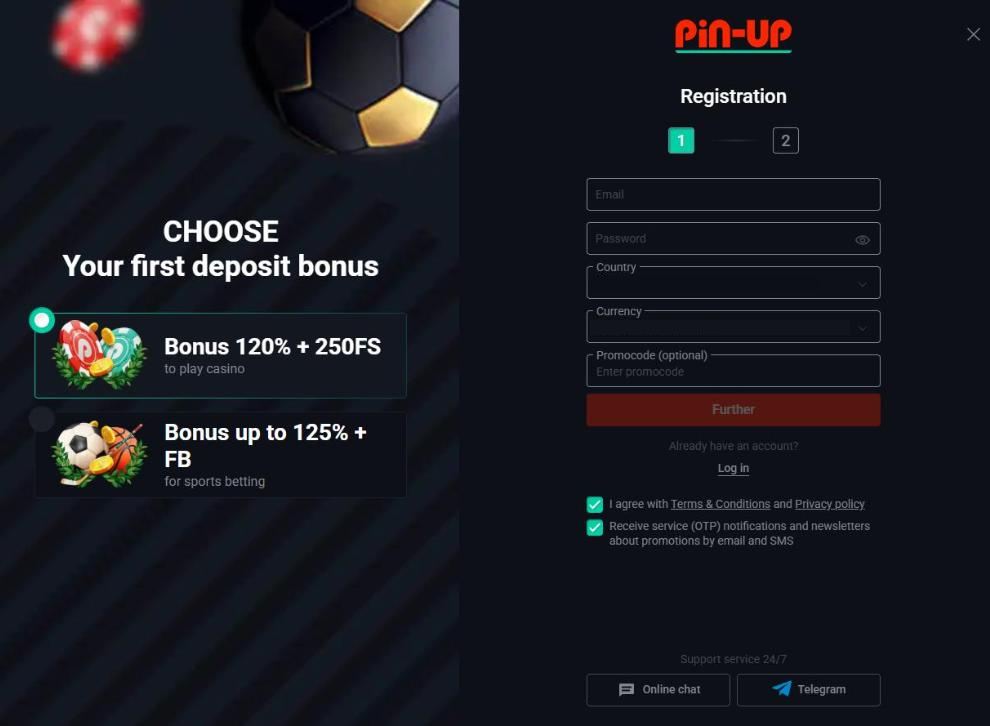
Click Registration
The red button in the header opens the sign-up page.
Choose your first-deposit bonus
“Bonus 120% + 250FS” for the casino or “Bonus up to 125% + FB” for sports betting.
Enter e-mail and password
Use an e-mail you actually read: bonus notices and password resets go there.
Check country and currency
The country is pre-filled from your location; the currency list includes USD and 13 local currencies.
Add a promo code (optional)
Leave the field empty if you do not have a code.
Confirm the Terms and press Further
Two boxes are pre-ticked: consent to the Terms and Privacy Policy, and service (OTP) notifications plus promotional newsletters by e-mail and SMS.
Complete step two
Finish the second step of the form and confirm your e-mail to activate the account.
The bonus is credited only after the first deposit, and its size depends on timing: the casino package gives 120% if you deposit within an hour of registering, and 100% later. Deposit thresholds and wagering are explained on the page about the first deposit bonus.
What Personal Data the Registration Requires
The Terms state that an account requires an e-mail address, a mobile phone number and a password. Full access to all functions — above all withdrawals — also requires your name, date of birth, passport or ID details, city and address. These details must be true: the casino can ask for documents to confirm them, and a player who passes the check becomes a “verified client”.
Entering a nickname or a relative’s data at sign-up is the most common reason for frozen winnings later, because the name on your ID and payment method must match the account. Documents can be uploaded in Profile → Document upload at any time, even right after registration. The full list is in the guide to account verification.
Account Rules Worth Knowing
- One account only. Offers are limited to one account per person, family, apartment, computer or IP address; duplicates can be closed with bonuses and winnings cancelled.
- 18+. Players must be at least 18 or the legal age in their country, and proof of age can be requested at any time.
- Restricted countries. Residents of the USA, France, the Netherlands and its territories, Australia, the United Kingdom, Germany, North Korea, Iran and Myanmar cannot play for real money.
- Inactivity. After 180 days without a login the account becomes inactive; an e-mail warning comes 30 days earlier.
- Phone checks. As part of KYC the operator may call the number in your profile; if you cannot be reached for two weeks after a withdrawal request, the account can be locked.
Pin Up Login Problems and Solutions
| Problem | What to do |
|---|---|
| “Wrong login or password” | Check the keyboard layout and Caps Lock, then use Restore password. |
| Reset e-mail does not arrive | Look in spam and promotions folders; ask the chat to resend. |
| Site does not open in your country | The Terms restrict several countries; access from them breaks the rules. |
| Account locked | Usually a pending KYC check or a duplicate account — contact support. |
| Logged out every time | Allow cookies for the site and turn off private browsing. |
For anything the table does not cover, the live chat is the fastest route; the channels are listed on the page about customer support.
Pin Up login FAQ
How do I log in?
Click Log in in the top-right corner, enter your phone number or e-mail and your password, then confirm. The same login works for the casino, the sportsbook, the app and the mobile site.
I forgot my password. What should I do?
Use the “Restore password” link under the login form. A reset link or code is sent to the contact you registered with; if nothing arrives, write to the 24/7 chat.
How long does registration take?
Step one — bonus choice, e-mail, password, country, currency and an optional promo code — takes about a minute. The official overview says the whole process takes less than two minutes.
Can I register without choosing a bonus?
The form starts with the choice between the casino bonus (120% + 250 FS) and the sports bonus (up to 125% + free bet). The bonus is credited only after a qualifying first deposit, so registration itself does not commit you to anything.
Can I have two accounts?
No. Promotions are limited to one account per person, family, apartment, computer or IP address, and duplicate accounts can be closed with winnings cancelled.
Do I need to verify my account after registration?
Not immediately, but the operator can request ID and proof of address at any time and always before the first withdrawal. Documents can be uploaded in the profile right after sign-up.