
Pin Up App Download: APK for Android and PWA for iPhone
The Pin Up Casino app comes in two forms. On Android it is an APK file that you download from the official site and install in three steps. On iPhone and iPad it is a progressive web app (PWA): you add the site to the home screen from Safari and get an icon that opens the full casino, Aviator and Pin Up Bet. One account works on every device.
120% + 250 FS casino bonus or up to 125% + free bet for sports — also in the app · 18+
Pin Up App at a Glance
Key facts about the Pin Up app:
| Android | APK file from the mobile page and the footer of the official site |
|---|---|
| iPhone / iPad | Web app (PWA) added to the home screen from Safari |
| Google Play / App Store | Not needed — APK on Android, PWA on iOS |
| Price | Free |
| Account | Same login, balance and bonuses as on desktop |
| Products | Casino, live dealers, crash games, sports, esports, predictions |
| Mobile navigation | Bottom bar: Live, Casino, Menu, Crash-games, Sport |
| Welcome bonuses | Casino 120% + 250 FS or sports up to 125% + free bet |
| Support | 24/7 chat and Telegram from the mobile menu |
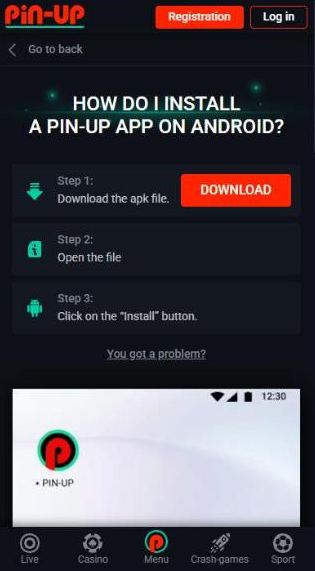
Pin Up Android App: How to Download and Install the APK
The installation guide on the official mobile page has three steps. Open the site in your phone’s browser so the file is saved straight to the device.
Download the APK file
Open the mobile page of the official site, or scroll to the footer of the homepage, and tap Download for Android.
Open the file
Tap the finished download in the notification panel. If there is no notification, look in the Downloads folder.
Tap “Install”
If the phone blocks the file, allow installation from unknown sources (Settings → Security) and run it again.
Log in or register
Open the PIN-UP icon and use your existing account or create a new one.
Is Pin Up on Google Play?
No. The Android app is distributed as an APK directly from the official site, which is common for real-money casino apps because store rules for gambling differ from country to country. During installation the phone may ask for permission to use device memory — the official FAQ explains that this is only the permission to write the app to storage. If the download does not start, the official advice is to open the page in incognito mode or ask the online chat for help.
What you need on Android
- A recent browser (Chrome, Samsung Internet or Firefox) to download the file.
- Permission to install apps from unknown sources for that browser.
- Some free storage and a stable Wi-Fi or mobile connection.
Pin Up iOS App: How to Install the PWA on iPhone and iPad
On Apple devices Pin Up works as a progressive web app. Instead of downloading a file, you save the official site to the home screen. The icon opens the site in its own window without the Safari address bar, and the mobile layout with the bottom bar loads automatically.
Open the official site in Safari
Use Safari — other iOS browsers may not offer the home-screen option.
Tap the Share icon
The square with an arrow is at the bottom of the screen on iPhone and at the top on iPad.
Choose “Add to Home Screen”
Scroll down the share sheet if you do not see it straight away.
Tap Add
The Pin Up icon appears next to your other apps.
Log in from the icon
Balance, bonuses and bet history are the same as on desktop.
What a PWA is
A progressive web app is a website that can be installed like an app. It takes almost no storage, needs no updates — it always loads the current version of the site — and does not require an Apple ID or a store account. Everything the desktop site offers, from the cashier to document uploads, works inside it.
What you need on iOS
- Safari with cookies allowed (Settings → Safari → “Block All Cookies” switched off).
- A stable connection, especially for live dealer tables and live betting.
What the Pin Up App Looks Like
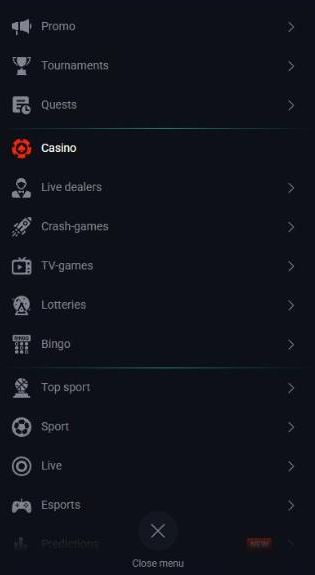
The app shows the Pin Up mobile version of the site, so the left sidebar disappears. The header keeps the logo, Registration and Log in, and a fixed bottom bar gives one-tap access to Live, Casino, Menu, Crash-games and Sport (in the sportsbook it switches to Live, Sport, Menu, My bets and Casino). The round Menu button opens the full list: Promo, Tournaments, Quests, Casino, Live dealers, Crash-games, TV-games, Lotteries, Bingo, Top sport, Sport, Live, Esports and Predictions.
The layout is identical in the APK and in the iOS web app, so bonus pages, the cashier and verification uploads work the same on both. The language switch and the 24/7 support button stay available in the menu.

Registration and Login in the Pin Up App
Tap Registration in the header. The mobile form is the same two-step form as on desktop: choose the casino or sports bonus, enter e-mail and password, check country and currency, add a promo code if you have one and confirm the Terms. Existing players tap Log in and enter their phone number or e-mail and password; “Restore password” sends a reset to the registered contact.
Typing on a small screen is where most mistakes happen, so double-check the e-mail address — it is used for password resets, bonus notices and responsible-gambling requests. Let the phone’s password manager suggest a strong password, and lock the phone with a PIN or biometrics. Each field of the form is explained in the guide on how to log in and register.
Casino Games in the App
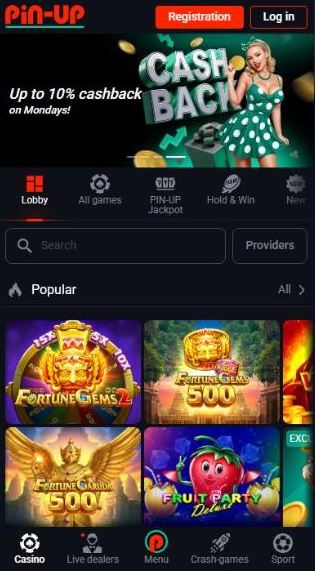
The mobile casino keeps the search field, the Providers button with 151 studios and the collection tabs — Lobby, All games, PIN-UP Jackpot, Hold & Win, New and many more. Slots such as Fortune Gems, Coin Volcano or Fruit Party Deluxe run in portrait or landscape; turning the phone sideways gives most modern titles a larger reel area.
Live dealer tables stream in adaptive quality but use far more data than slots, so Wi-Fi is the better choice for a long roulette or blackjack session. Collections and studios are described on the page about online slots.
Aviator on Mobile
Crash-games has its own button in the bottom bar, so Aviator, PIN-UP JetX, PIN-UP Crash and Mines are one tap away. Aviator opens in demo mode for guests, which is useful for testing the auto cashout on a touch screen before real stakes. A lagging network can make a manual cashout late, so an auto cashout set before take-off is the safer choice on mobile data. Rules and bonus restrictions are explained on the page about the Aviator game.
Sports Betting in the Pin Up App
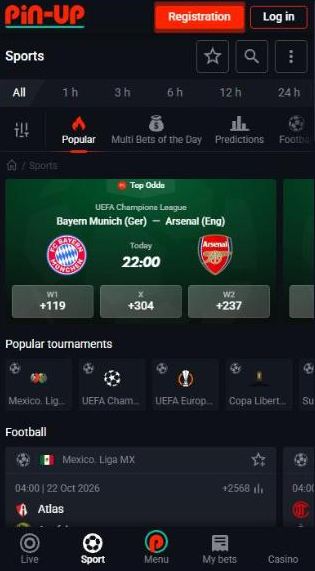
The mobile sportsbook opens with time filters (All, 1 h, 3 h, 6 h, 12 h, 24 h), quick tabs for Popular, Multi Bets of the Day, Predictions and each sport, a carousel of top matches and popular tournaments. The bottom bar adds My bets, so open and settled bets are always one tap away.
Live betting is where a phone is most convenient: follow the match tracker, add selections and confirm them in the slip with quick-stake buttons. Markets and bet types are covered in the guide to sports betting.
Bonuses in the Pin Up App
There is no separate mobile-only welcome offer: the casino package (120% up to $100,000 plus 250 free spins for a first deposit of $500 or more) and the sports package (up to 125% plus a free bet of up to $200) are chosen in the mobile sign-up form the same way as on desktop. The bonus policy also mentions that some promotions require an extra action such as downloading or updating the app, so occasional app offers are possible.
Wagering progress belongs to the account, not to the device, so you can start clearing a bonus on the phone and finish on a laptop. Terms, caps and examples are on the bonus page.
Deposits and Withdrawals on Mobile
The cashier works the same in the app: choose a method, enter the amount and confirm. For the first withdrawal you can photograph your ID and proof of address with the phone camera and upload them in Profile → Document upload. Limits and processing times do not depend on the device; details are in the guide to making deposits.
- Take document photos in daylight, with all four corners visible and no glare.
- Use only payment methods in your own name — third-party payments are not allowed.
- For crypto, copy the wallet address shown in the cashier each time.
- Avoid public Wi-Fi for payments, or switch to mobile data.
Pin Up APK vs iOS PWA
| Feature | Android (APK) | iPhone / iPad (PWA) |
|---|---|---|
| Installation | APK file from the official site | Add to Home Screen in Safari |
| Storage | Uses phone memory | Almost none |
| Updates | New APK versions | Automatic, always current |
| Games and sports | Full catalogue | Full catalogue |
| Bonuses | Same packages, possible app offers | Same packages |
| Settings needed | Allow unknown sources | Cookies allowed in Safari |
Advantages
- Opens from an icon, without typing the address
- Same account and wallet as on desktop
- Bottom bar with Casino, Crash-games and Sport
- Free and installed in under a minute
Limitations
- No Google Play or App Store listing
- Android needs unknown sources allowed
- The iOS web app depends on Safari
- A stable connection is needed for live games
Is the Pin Up App Safe?
An APK is safe when it comes from the operator itself. Download it only from the mobile page or the footer button of the official site, never from file-sharing sites or messages offering a “modified” version — such files can contain malware or steal login data. After installation you can switch the unknown-sources permission off again. The iOS web app carries no such risk because nothing is installed except a home-screen shortcut, but make sure you add it from the official site and not from a look-alike page.
- Lock the phone with a PIN or biometrics; a logged-in app gives access to your balance.
- Keep the operating system updated so security patches are installed.
- Log out on shared devices and do not store the password in a shared browser.
How to Protect Your Pin Up Account on the Phone
A casino app on a phone that stays logged in is convenient — and risky. A child playing with your phone, a friend checking the score or anyone who picks up an unlocked device can open the app and place a bet or start a slot with your real balance. The bet slip also has a one-click mode, so a single accidental tap can be enough. A few minutes of setup prevent that.
Lock the Pin Up app on Android
Open the phone settings
Most Android brands have a built-in app lock: Samsung calls it Secure Folder, Xiaomi App lock, other makers use names like App lock or Privacy.
Select the PIN-UP app
Add it to the list of locked apps.
Choose PIN, pattern or fingerprint
Use a code that differs from the screen-lock code if other people know that one.
Test it
Close the app completely and open it again — it should ask for the code first.
Lock the Pin Up web app on iPhone
Use Face ID or Touch ID for the browser
On recent iOS versions you can long-press an app icon and choose “Require Face ID”; use it for Safari, where you open the Pin Up site.
Set a Screen Time limit
Settings → Screen Time → App Limits → Add Limit can restrict Safari or a specific website behind a Screen Time passcode.
Turn off AutoFill for the site
So nobody can log in with a saved password if you sign out.
Account safety checklist
- Unique password. Never reuse the password of your e-mail or social networks; a password manager helps.
- Keep one-click betting off in the bet slip unless you really need it for live bets.
- Log out on shared devices and when you hand the phone to someone.
- Never share codes. Support does not ask for your password or one-time codes; ignore messages that do.
- Set a deposit limit in the account so even an unwanted session cannot cost more than you allow.
- Check My bets regularly and tell support at once if you see a bet you did not place.
- Keep the phone updated and install the APK only from the official site.
Pin Up App Problems and Fixes
| Problem | Fix |
|---|---|
| Android accepts only Google Play files | Settings → Security → Unknown sources → enable for your browser. |
| The APK download does not start | Open the page in incognito mode; if it still fails, ask the online chat. |
| No download notification | Look for the file in the Downloads folder. |
| “Modify or delete USB storage” request | It is the permission to write the app to memory; allow it. |
| No “Add to Home Screen” on iPhone | Open the site in Safari, not in another browser. |
| iOS icon logs you out every time | Allow cookies in Safari settings and turn off private browsing. |
Pin Up app FAQ
Where can I download the Pin Up app?
The Android app is offered as an APK file on the mobile page of the official site and through the “Download for Android” button in its footer. On iPhone and iPad the app is installed as a web app (PWA) from Safari via Share → Add to Home Screen.
Is the app on Google Play?
No. The official site distributes the Android app as an APK file. You download it from the site and allow installation from unknown sources in the phone settings.
How do I install the app on iPhone?
Open the official site in Safari, tap the Share icon and choose Add to Home Screen. The icon then opens the full casino and sportsbook like a native app, without downloading a file.
Is the app free?
Yes. Both the APK and the iOS web app cost nothing.
Can I get a bonus in the app?
Yes. The same welcome packages are available on mobile, and the bonus policy mentions that some promotions require downloading or updating the app.
How do I put a password on the app?
On Android use the built-in app lock of your phone (Secure Folder, App lock or similar, depending on the brand) and protect the casino app with a PIN or fingerprint. On iPhone require Face ID for Safari or set a Screen Time limit with a passcode.
Do I need a new account for the app?
No. The APK, the iOS web app and the desktop site use the same login, balance and bonuses.